
The Illusion of Motion and video
What we call “video” is actually a rapid sequence of still images. Your brain connects these separate frames into smooth motion, not because motion exists, but because your visual system fills in the gaps. FPS (Frames Per Second) controls how convincing that illusion feels.
1. Persistence of Vision, Why Motion Exists at All
Your eyes don’t instantly forget an image when it disappears. Instead:
Each frame lingers in your visual perception for a tiny fraction of a second.
When frames appear fast enough:
- The previous image hasn’t fully faded
- The next image arrives
- Your brain blends them into motion
This effect is called persistence of vision, but modern neuroscience says it’s actually a mix of:
- retinal afterimage
- motion prediction in the brain
- temporal integration (brain smoothing time gaps)
So motion isn’t “real” it’s a prediction your brain constructs.
Your brain doesn’t need perfect continuity it only needs enough information to guess motion.
Higher FPS (60, 120, 240) What Actually Changes
More FPS doesn’t make motion “more real” it makes motion more temporally precise.
At 24 FPS
- Each frame lasts ~41 ms
- The brain interpolates missing movement
- Feels cinematic because of the blur
At 60 FPS
- Frame every ~16 ms
- Less guessing required
- Motion feels responsive
At 120+ FPS
- Very low temporal gaps
- The brain stops needing heavy prediction
- Feels hyper-real or “too smooth” (soap-opera effect)
Your brain evolved to tolerate missing data, so 24 FPS works surprisingly well.
Humans are more sensitive to timing errors than visual detail.
Examples:
- 1080p @ 60 FPS often feels smoother than 4K @ 24 FPS
- Gamers prefer higher FPS even at lower graphics quality
That’s because motion processing lives in a fast neural pathway:
Magnocellular visual pathway → prioritizes movement and timing over fine detail.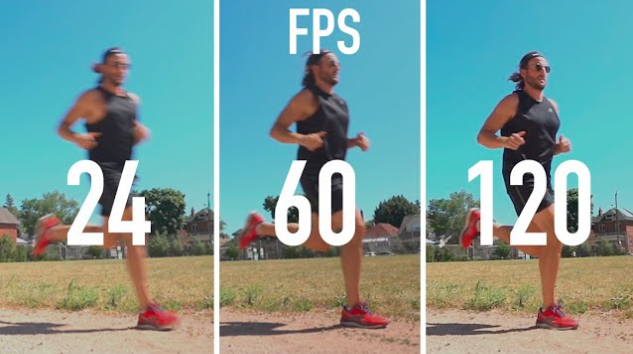
2. Aspect Ratios and Resolution: How Pixels Define What You See
1. Aspect Ratios, The Shape of the Frame
An aspect ratio is simply width : height.
4:3 (Standard / Academy Ratio)
- Older TVs, early digital video, and many classic films.
- Almost square compared to modern screens.
- Example resolution: 640×480.
Characteristics:
- More vertical space.
- Good for older broadcast formats.
- On modern widescreen displays, it produces black bars on the sides (pillarboxing).
16:9 (Widescreen Standard)
- Current default for TVs, YouTube, games, and most monitors.
- Example resolutions: 1280×720, 1920×1080, 3840×2160.
Why it became standard:
- Matches human horizontal field of view better.
- Works well for cinematic framing.
- Efficient use of modern display panels.
Important idea:
Aspect ratio does not define quality. A 4:3 image can be very sharp if it has many pixels.
2. Pixels and Resolution, How Much Detail Exists
SD (Standard Definition)
Typical examples:
- 480p (720×480)
- 576p (PAL regions)
Characteristics:
- Low pixel count.
- Noticeable softness on large modern screens.
- Designed for older CRT displays.
HD (High Definition)
Common HD formats:
- 720p - 1280×720
- 1080p - 1920×1080
What “1080p” means:
- 1080 vertical pixels.
- Progressive scan (“p”), meaning full frames rather than interlaced fields.
Why 1080p became dominant:
- Balanced detail and file size.
- Works well with a 16:9 aspect ratio.
UHD / 4K
Consumer UHD resolution:
- 3840×2160
Key detail:
- Exactly 4× the pixels of 1080p.
- Same 16:9 shape, just denser.
Common misunderstanding:
4K does not make motion smoother. It only increases spatial detail.
3. How Aspect Ratio and Resolution Work Together
Think of aspect ratio as a container and resolution as how finely that container is filled.
Examples:
- 1920×1080
- Aspect ratio: 16:9
- Resolution level: HD
- 1440×1080
- Same height, different width → different aspect ratio.
Two videos can share the same resolution height but feel completely different because the horizontal dimension changes the framing.
5. Pixel Count vs Perceived Sharpness
More pixels do not automatically mean a better image.
Perceived sharpness depends on:
- screen size
- viewing distance
- compression quality
- color sampling
- bitrate
A well-encoded 1080p video can look better than a poorly compressed 4K file.
3. The Math of Raw Video: Why Uncompressed Video Becomes Enormous
Raw (uncompressed) video is simply a continuous stream of images where every pixel’s color information is stored without compression. Because nothing is reduced or discarded, the file size grows extremely fast. The size can be calculated using a straightforward formula.
File Size (bytes) = Width × Height × BitsPerPixel × FramesPerSecond × Seconds ÷ 8
Width × Height → total pixels per frame.
BitsPerPixel (color depth) → how much color data each pixel stores.
FPS → how many frames appear every second.
Seconds → video duration.
Divide by 8 because bits convert to bytes.
2. Understanding Color Depth (Bits Per Pixel)
Common examples:
- 8-bit RGB (24 bits per pixel)
- 8 bits for Red + 8 for Green + 8 for Blue.
- 10-bit RGB (30 bits per pixel).
3. Example Calculation 1080p Raw Video
Let’s calculate a 1920×1080, 30 FPS, 8-bit RGB, 1-minute video.
Step 1: Pixels per frame
1920 × 1080 = 2,073,600 pixels
Step 2: Bits per frame
2,073,600 × 24 bits = 49,766,400 bits
Step 3: Bits per second
49,766,400 × 30 FPS = 1,492,992,000 bits/sec
Step 4: Convert to bytes
1,492,992,000 ÷ 8 ≈ 186,624,000 bytes/sec
≈ 178 MB per second
Step 5: One minute size
178 MB × 60 ≈ 10.7 GB
A single minute of raw 1080p can exceed 10 GB.
4. Color Spaces and Chroma Subsampling: What “YUV420” Means
1. RGB vs YUV - Why Video Doesn’t Store Pure RGB
Computers render images in RGB:
R = Red
G = Green
B = Blue
But video codecs usually convert RGB into YUV (or YCbCr).
In YUV:
- Y (Luma) = brightness information.
- U and V (Chroma) = color difference signals.
Why split brightness from color?
Because the human visual system prioritizes light intensity over precise color detail. Edges, shapes, and motion are mostly detected through brightness changes, not color accuracy.
This separation allows compression systems to keep brightness sharp while reducing color data without the viewer noticing much loss.
2. The Human Vision Trick
Your eyes have two main functional channels:
- A pathway that detects luminance and motion with high sensitivity.
- A pathway that detects color with lower spatial precision.
Biologically:
- Humans detect brightness contrast at very fine detail.
- Color resolution is comparatively blurry.
This means:
You can reduce color resolution dramatically while keeping brightness intact, and the image still appears sharp.
Video compression exploits this limitation.
4:4:4 — No Subsampling
- Every pixel has full color information.
- Highest color accuracy.
- Used in high-end editing, VFX, and graphics workflows.
Think of it as:
Brightness and color both stored at full resolution.
4:2:2 — Half Horizontal Color Resolution
- Brightness is stored for every pixel.
- Color stored at half horizontal detail.
Result:
- Slight reduction in color precision.
- Often used in professional broadcast.
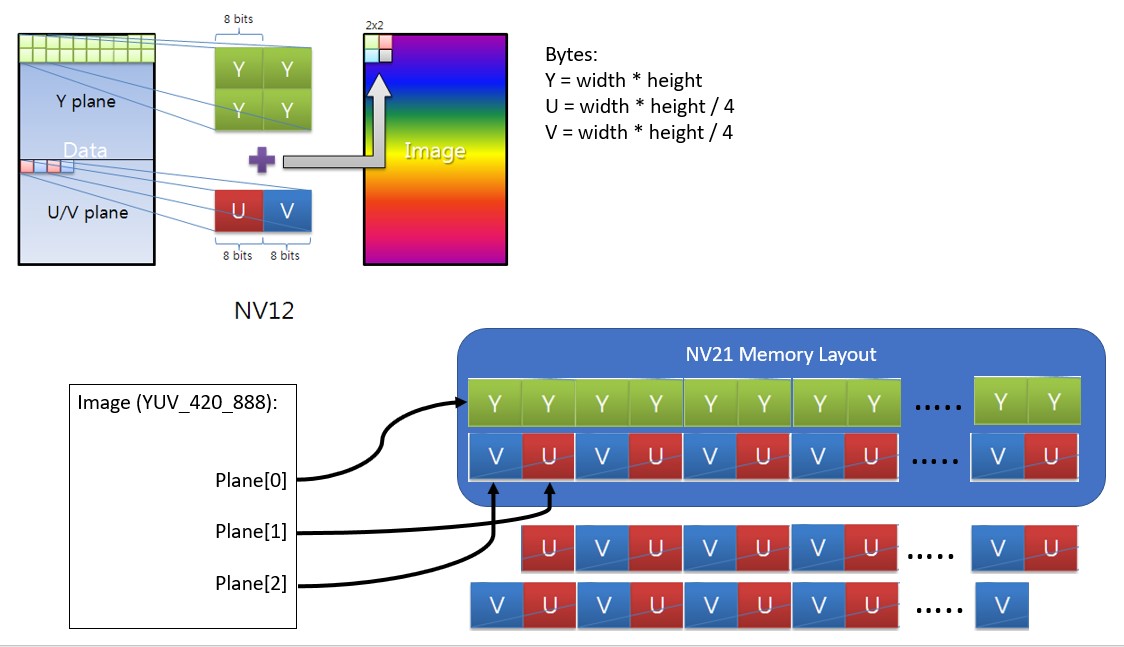
4:2:0 — Quarter Color Resolution (Most Common)
This is what “YUV420” refers to.
How it works conceptually:
- Brightness (Y) is saved for every pixel.
- Color (U and V) is shared across blocks of pixels.
In a 2×2 pixel area:
- 4 brightness samples.
- 1 chroma sample.
So color resolution becomes one-quarter of brightness resolution.
Why it still looks good:
Your brain mainly relies on the sharp luma channel to perceive edges.
5. When YUV420 Causes Problems
Although efficient, 4:2:0 has drawbacks:
- Color text or UI elements can look smeared.
- Fine red or blue edges lose clarity.
- Heavy color grading reveals artifacts.
That is why:
- Video editing and compositing often prefer 4:4:4 or 4:2:2.
Final delivery formats usually return to 4:2:0 for distribution
5. Bit Depth: 8-bit vs 10-bit color. Why 8-bit causes ugly "banding" in the sky, and why 10-bit is the modern standard.
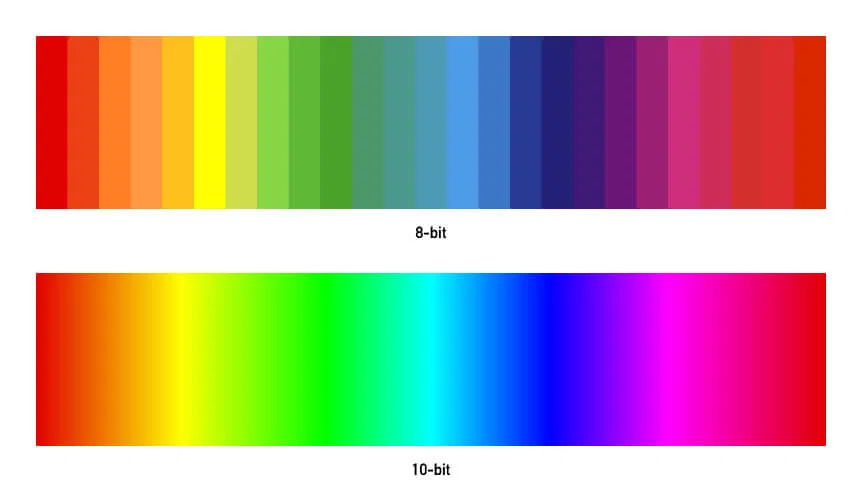
Bit depth refers to the number of tonal values each color channel can represent. It does not change resolution or FPS; it controls how smoothly colors and brightness transition between shades. This single parameter is one of the biggest reasons modern video looks cleaner than older digital footage.
1. What “Bit Depth” Actually Means
Each pixel stores numeric values for color channels. The number of bits determines how many discrete levels are available.
8-bit Color
- 8 bits per channel.
- 2⁸ = 256 levels of Red, Green, and Blue.
- Total possible colors ≈ 16.7 million (256³).
This sounds large, but gradients — especially skies, shadows, or fog — reveal the limitation because brightness changes continuously in the real world.
10-bit Color
- 10 bits per channel.
- 2¹⁰ = 1024 levels per channel.
- Four times more tonal steps than 8-bit.
Important detail:
The jump from 8-bit to 10-bit is not a small upgrade. It increases tonal precision by a factor of four, which dramatically improves smooth transitions.
2. Why 8-bit Causes Banding
Banding appears when there are not enough intermediate color values to represent a smooth gradient.
Imagine a sunset sky:
Real world:
brightness changes continuously
8-bit representation:
step → step → step → step
When the steps become visible, you see stripes or rings instead of a smooth fade. This happens because:
- Large areas of similar color expose quantization limits.
- Compression exaggerates the problem.
- Color grading pushes pixel values, making gaps more obvious.
Banding is not always present in raw footage; it often becomes visible after editing, exporting, or heavy compression.
3. Why 10-bit Looks Smoother
With 1024 tonal steps per channel:
- Gradients have far smaller jumps between values.
- Sky, smoke, shadows, and skin tones look continuous.
- Color grading has more numerical headroom before artifacts appear.
The human eye is especially sensitive to brightness gradients. Even if you cannot consciously detect “10-bit,” your brain perceives the image as cleaner and more natural because edges between tones disappear.
4. The Role of HDR and Modern Displays
High Dynamic Range formats depend heavily on higher bit depth.
Reasons:
- HDR expands brightness range from deep shadows to bright highlights.
- More range requires more tonal precision to avoid stepping artifacts.
- 8-bit struggles when representing wide brightness ranges because the same 256 steps must cover a larger span.
That is why most HDR standards require at least 10-bit precision.
5. Why 8-bit Still Exists
Despite its limitations, 8-bit remains common because:
- Smaller file sizes.
- Lower bandwidth for streaming.
- Faster encoding and decoding.
For casual viewing, many people will not notice the difference unless gradients or heavy editing are involved.
However, production pipelines are increasingly capturing or processing video internally at 10-bit or higher, even if the final delivery is compressed.